Bretton AI agents can now create cases from any spreadsheet, in any layout.
Bretton AI can now create cases from the files your team already receives. Upload a CSV or Excel file, tell the agent how to read it, and the agent proposes the cases. Your team reviews the results and creates every case in one step.
Until now, creating cases in bulk meant reformatting each file to match the Bretton AI upload template, or creating cases one at a time through the API or the New case form. Most files don't arrive in that shape. A weekly referral export has extra tabs, subtotal rows, closed accounts and one row per transaction where you need one case per customer. Agentic Upload reads the file as it is.
What's new
- Any layout works. Upload a CSV or Excel file with any number of sheets, extra columns, totals or blank rows. No reformatting.
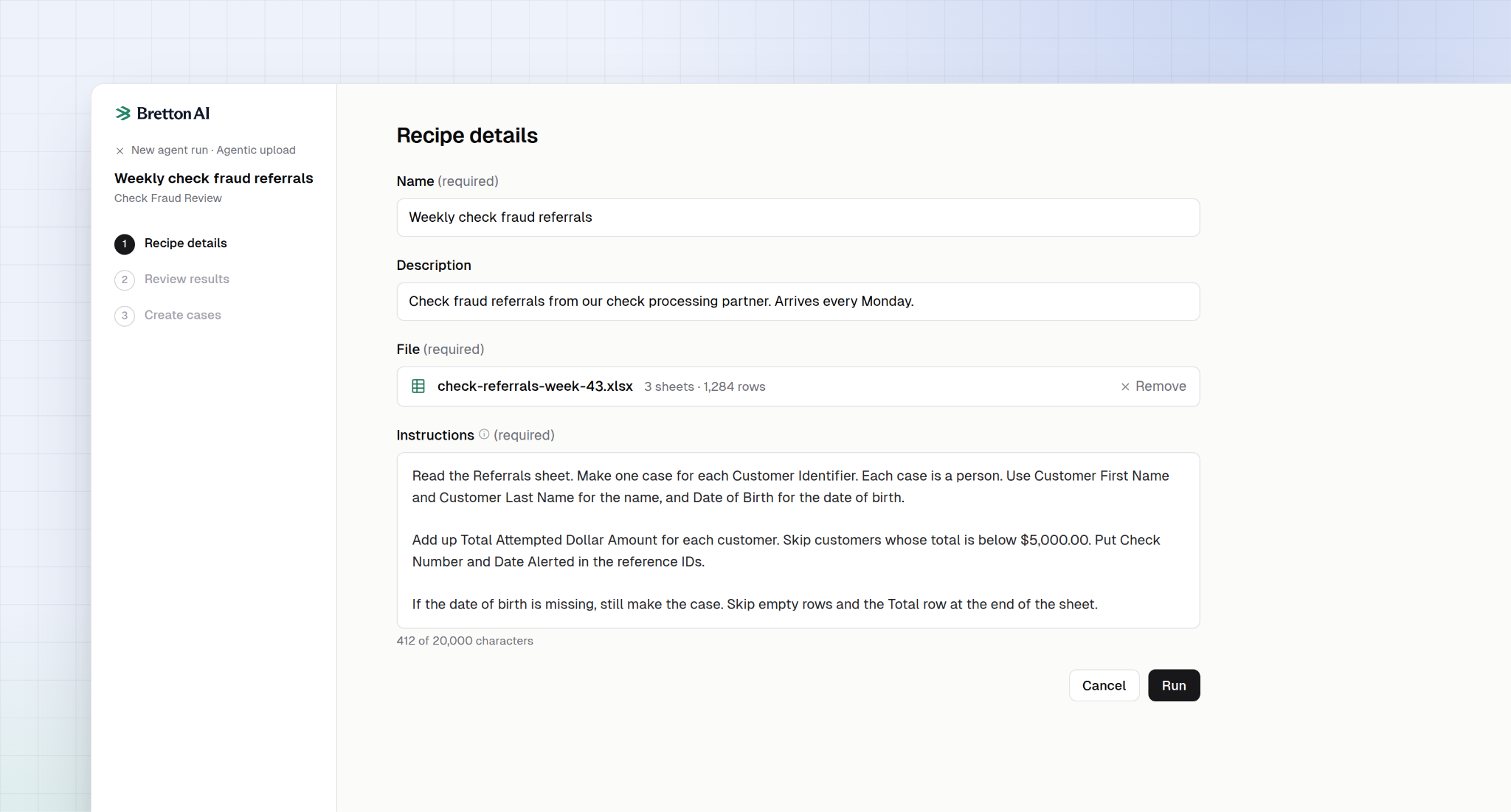
- You write the rules in your own words. Tell the agent what one case is, who it's about, which rows to skip and what to add up. For example: "Make one case per customer. Add up each customer's attempts and skip customers below $5,000."
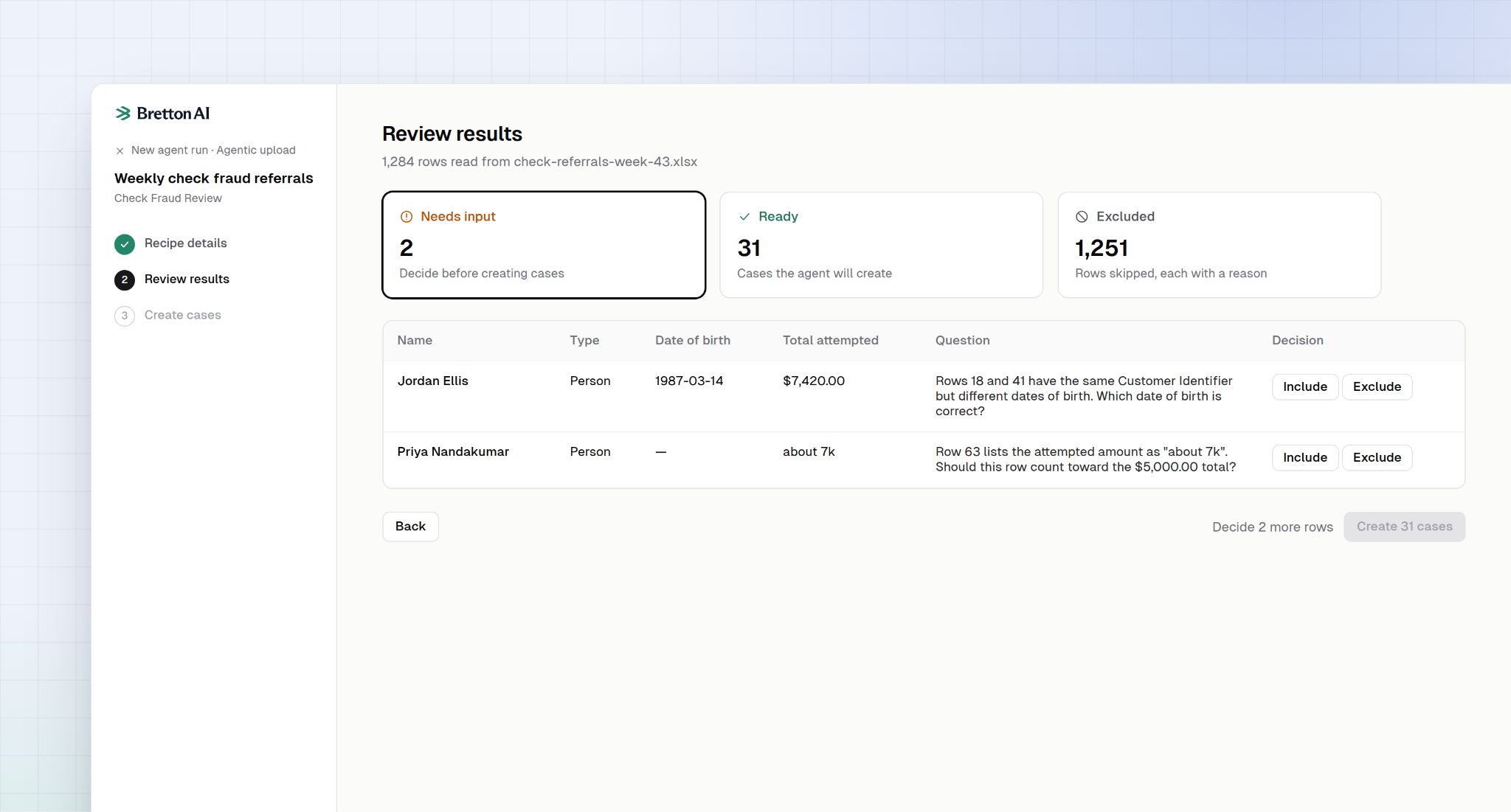
- Every row is accounted for. The agent sorts each row into Ready, Needs input or Excluded. Excluded rows show the reason, so a reviewer can confirm nothing was dropped by mistake.
- The agent asks when the data is unclear. If a member has two dates of birth, or a balance reads "about 7k," the agent flags the row with a question. Your team decides whether to include or exclude it.
- Nothing is created without approval. Cases are created only after a person reviews the results and confirms. Each new case then starts an agent run.
- Recipes save the rules. Save your instructions as a recipe and reuse it for the next file of the same kind. Each change to a recipe creates a new version, so your team can see when the rules changed.
Who's using it
- Check fraud referrals at a $3 billion commercial bank. The bank receives a weekly Excel file of check fraud referrals from a partner, with one row per check attempt. Its recipe groups the rows by customer, adds up each customer's attempts and creates a case for every customer at $5,000 or more. Each case then starts a Bretton AI agent run.
- A one-time screening project at a regulated digital asset firm. The firm loaded a batch of screening cases from its own file in one pass, without reformatting it first.
How it works
- Open an agent, click New run and choose Agentic upload.
- Create a recipe: a name, a description, the file and your instructions.
- The agent reads the file and sorts every row into Ready, Needs input or Excluded.
- Your team answers the agent's questions and checks the excluded rows.
- Click Create cases. Each case starts an agent run.
When the next file arrives, open the recipe, choose the new file and run it.
Limits
Each run takes one CSV or XLSX file of up to 25 MB, 20,000 rows and 500 cases. Split larger files into parts and run each one.
Getting started
Agentic Upload is available now on every Bretton AI agent. Open an agent, click New run and choose the Agentic upload tab. Your Bretton AI team can help you write your first recipe.
AI agents for the financial back office
Bretton builds AI agents for the back office of banks and financial institutions — compliance review, investigations and the operational work that still scales with headcount. Payward, the parent company of Kraken, uses Bretton to clear high-risk cases with full quality control instead of hiring against the backlog.